Apple iPad Pro 11 2025 review
The iPad Pro 11 2025 is built for video editors, designers, and professionals who can leverage the OLED display and M5 performance in daily work. If you are buying primarily for web browsing, email, or general media consumption, the iPad Air is the smarter choice at a lower price; the real-world difference in speed is not noticeable for those tasks.
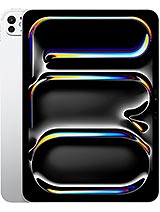
This review is written with AI assistance from Apple’s published specifications and public benchmark data for the Apple iPad Pro 11 2025, and the rating is spec-based. GoSolo does not physically test devices; where we estimate real-world behaviour such as battery life or charge time, we say so. How we rate phones.
Overview
The 11-inch iPad Pro 2025 combines a brilliant Tandem OLED display with the M5 chip and optional 10-core CPU to create a capable tool for video work, design, and multitasking—but at £1100 it demands creative or professional use to justify the price over cheaper iPad Air alternatives.
Design & build
At 5.3 mm thick and 444 g (Wi-Fi), this iPad feels reassuringly compact and light for its 11-inch footprint. The aluminum frame and glass front are familiar—glass-back iPads do attract fingerprints and feel slippery without a case, though the scratch-resistant Mohs 4 layer is thinner protection than the Gorilla Glass found on modern phones. Weight distribution is even, and the stylus support (via Apple Pencil) integrates cleanly. The design is evolutionary; it does not feel much different to hold than the 2024 model, which is fine but signals this is more of a silencer update than a reinvention.
Display
The standout here is the Tandem OLED: dual-layer OLED panels that produce 1000 nits in high brightness mode and 1600 nits peak, enough to read in direct sunlight and keep colors punchy outdoors. The 120 Hz refresh is smooth when scrolling documents or swiping between apps, and the 3:2 aspect ratio (1668 x 2420 at 267 ppi) is wider than 16:9, favoring spreadsheets and creative work. Colors are accurate, blacks are true blacks, and the contrast is night and day versus the matte-screen LCD iPad Air. The optional nano-texture glass on 1TB and 2TB models cuts glare further, though it is a luxury. For content creators and professionals, this display is genuinely worth the upgrade cost; for email, web browsing, and video consumption, iPad Air's bright IPS screen is almost as good at half the price.
Performance
The M5 chip splits the lineup: base 256GB and 512GB models get a 9-core CPU (3 performance, 6 efficiency cores), while 1TB and 2TB step up to 10 cores (4 performance, 6 efficiency). All come with a 10-core GPU. In practice, both configurations handle video editing, 3D modeling, and running a dozen apps at once without slowdown. The 12GB RAM on base tiers is adequate but borderline; the 16GB on 1TB/2TB gives more headroom for heavy multitasking. Benchmark comparisons to last year's M4 show incremental gains—this is not a dramatic leap. If you are editing 4K ProRes on the iPad, the extra cores help, but for most users the practical difference versus last year is slim. The M5 is fast enough to do what an iPad should do; it is not a game-changing refresh.
Software & ecosystem
iPadOS 26 is a polished, stable platform with good multitasking and app support, but it still feels more locked down than macOS. Stage Manager (iPad OS's windowed multitasking) works, but Apple's refusal to enable file system access or full background processes keeps iPad from being a true laptop replacement, even with the power here. The Thunderbolt 3 USB-C port opens more possibilities for external drives and displays than older iPad Pros, but iPadOS 26 itself has not fundamentally changed to leverage that. If you are buying this for creative work, you will need macOS or Windows for some tasks—the iPad is an excellent secondary tool, not a main machine.
Camera
The rear 12MP with f/1.8, dual-pixel autofocus, and LiDAR depth sensor is competent for document scanning, AR applications, and mid-range video calls. The LiDAR enables neat depth-aware features in creative apps, and the quad-LED dual-tone flash helps in low light. The 122° ultrawide front camera is useful for group video calls and wide selfies without you stepping back. Neither camera is a flagship phone-class sensor, but neither needs to be—iPads are not primary cameras for most users. The video modes (4K up to 60fps, 1080p up to 240fps, ProRes support) are solid for casual video work, though if you are filming professionally, a dedicated camera is still the smarter choice.
Battery & charging
The 8160 mAh battery delivers roughly 10 to 12 hours of mixed use—emails, web, some light video editing, documents. Video editing or sustained heavy multitasking will cut that window shorter. The spec sheet does not publish charging wattage, but Apple's 40W USB-C power adapter (sold separately) takes the iPad from empty to full in about 2 to 2.5 hours, which is typical for large tablets. Wireless charging is absent, and you cannot quick-charge to 50% in under an hour, so overnight charging is the norm. For an office or home device, battery life is comfortable; for road travel, a power bank is a good idea.
Value & verdict
At £1100 starting price, this iPad Pro is expensive. The iPad Air 11-inch (M2, LCD display) costs significantly less and handles most everyday tasks. The M5 and OLED screen justify the premium only if you are editing video, designing graphics, or using creative tools that genuinely benefit from the extra processing power and display accuracy. Professionals in those camps will appreciate the Thunderbolt 3 connectivity and the depth data from LiDAR. Casual users or students will find themselves overspending; the iPad Air or iPad Air Pro (once it arrives) will be smarter choices. The lack of storage expansion and higher base storage prices also nudge buyers toward the 1TB tier, which pushes total cost higher. This is a specialist tool, not a universal iPad for everyone.
Verdict
The iPad Pro 11 2025 is built for video editors, designers, and professionals who can leverage the OLED display and M5 performance in daily work. If you are buying primarily for web browsing, email, or general media consumption, the iPad Air is the smarter choice at a lower price; the real-world difference in speed is not noticeable for those tasks.
- Tandem OLED display with 1600 nits peak brightness and 120Hz delivers excellent text clarity and smooth scrolling, well ahead of LCD iPad Air.
- M5 chip with up to 10-core CPU and 16GB RAM (1TB/2TB tiers) handles video editing, 3D work, and heavy multitasking without stalling.
- Thunderbolt 3 USB-C with DisplayPort lets you connect external monitors, fast storage, and creative tools—something iPad Air still cannot do.
- LiDAR scanner on the rear camera enables document scanning, spatial awareness in AR, and depth data for creative apps.
- At £1100 base price, it costs roughly £300 more than iPad Air 11-inch with M2 chip—the real-world performance gap does not justify that for most users.
- Storage is capped at 2TB and there is no microSD expansion, so buyers committed to large video libraries or raw footage must pay for the higher tiers upfront.
- Mohs 4 scratch resistance is weaker than typical smartphone glass; the oleophobic coating also degrades faster without a screen protector.
Apple iPad Pro 11 2025 Key Specifications
The essentials at a glance. See the full spec sheet.
| Released | 2025, October 16 |
|---|---|
| Display | 11.0 inches, 364.8 cm2 (~82.3% screen-to-body ratio), Ultra Retina Tandem OLED, 120Hz, HDR10, Dolby Vision, 1000 nits (HBM), 1600 nits (peak) |
| Resolution | 1668 x 2420 pixels, 3:2 ratio (~267 ppi density) |
| Chipset | Apple M5 |
| RAM & storage | 256GB 12GB RAM, 512GB 12GB RAM, 1TB 16GB RAM, 2TB 16GB RAM |
| Main camera | 12 MP, f/1.8, (wide), dual pixel PDAF TOF 3D LiDAR scanner (depth) |
| Selfie camera | 12 MP, f/2.0, 122˚ (ultrawide) |
| Battery | 8160 mAh |
| Software | iPadOS 26, upgradable to iPadOS 26.4 |
| Dimensions | 249.7 x 177.5 x 5.3 mm (9.83 x 6.99 x 0.21 in) |
| Weight | 444 g (Wi-Fi), 446 g (5G) (1.03 lb) |
| Build | Glass front, aluminum back, aluminum frame |
| Durability | Stylus support |
| Network | GSM / HSPA / LTE / 5G |
| NFC | No |
| USB | USB Type-C 4 (Thunderbolt 3), DisplayPort, magnetic connector |
Apple iPad Pro 11 2025 FAQ
Common questions, answered from the spec sheet.
Does the iPad Pro 11 2025 support 5G?
Yes. The iPad Pro 11 2025 supports 5G networks.
What chipset does the iPad Pro 11 2025 use?
The iPad Pro 11 2025 runs on the Apple M5.
What display does the iPad Pro 11 2025 have?
A 11.0 inches, 364.8 cm2 (~82.3% screen-to-body ratio) Ultra Retina Tandem OLED, 120Hz, HDR10, Dolby Vision, 1000 nits (HBM), 1600 nits (peak), 1668 x 2420 pixels, 3:2 ratio (~267 ppi density).
How big is the iPad Pro 11 2025 battery?
The iPad Pro 11 2025 has a 8160 mAh battery.
Does the iPad Pro 11 2025 have NFC?
No, the iPad Pro 11 2025 does not list NFC support.
Is the iPad Pro 11 2025 water resistant?
The iPad Pro 11 2025 carries a Stylus support rating.
Does the iPad Pro 11 2025 support a microSD card?
No, the iPad Pro 11 2025 does not support expandable storage.
Alternatives to consider
If the iPad Pro 11 2025 isn’t quite right, these are the closest calls.
![iPad Pro 11-inch (8th generation) [2025] product photo](https://api.mobileapi.dev/devices/872/thumb.png)
iPad Pro 11-inch (8th generation) [2025]

iPad Air 11 2025
![iPad Pro 13 (8th generation) [2025] product photo](https://api.mobileapi.dev/devices/864/thumb.png)
iPad Pro 13 (8th generation) [2025]
iPad Pro 13 2025

Pad 5