Infinix Xpad 20 Pro review
The Xpad 20 Pro suits budget-conscious buyers who want a large screen for reading, video, and light work, and won't miss the absence of fast charging or good cameras. Anyone planning to use it for gaming, photography, or demanding multitasking should look elsewhere, and those who value stylus work should confirm that Infinix sells or bundles one and that your apps are compatible.
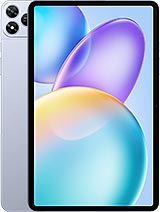
This review is written with AI assistance from Infinix’s published specifications and public benchmark data for the Infinix Xpad 20 Pro, and the rating is spec-based. GoSolo does not physically test devices; where we estimate real-world behaviour such as battery life or charge time, we say so. How we rate phones.
Overview
The Xpad 20 Pro is a 12-inch tablet built for casual reading, video, and light work on a budget, with a capable processor and all-day battery that keep it practical, but the basic cameras and slow 18W charging are reminders of its price point. It's better as a media companion than a creative device or gaming machine.
Design & build
At 545g and 6.6mm thick, the Xpad 20 Pro is light and trim for a 12-inch tablet, striking a balance between portability and a screen large enough to justify carrying it. The glass front, aluminum frame, and aluminum back feel familiar rather than cheap, though they attract fingerprints and are not ruggedized for drops. Stylus support is listed but there's no mention of one in the box, so expect to buy it separately if note-taking is your goal. The Nano-SIM slot is a relic in the tablet world; most buyers in 2025 will use Wi-Fi and skip cellular entirely.
Display
The 12-inch, 1200 × 2000 IPS LCD with 90Hz refresh is the Xpad 20 Pro's strongest card. At 450 nits it's bright enough to use outdoors without washing out, and the 5:3 aspect ratio is wider than a laptop, suited to video and reading. The 194 ppi density means individual pixels are visible if you hold it close, a trade-off that becomes clear only if you've used sharper tablets, but for casual reading and streaming it's fine. The 90Hz smooths scrolling and swiping noticeably compared to 60Hz, a detail that matters on a device you'll use for long browsing sessions.
Performance
The Helio G100 Ultimate is a capable upper-midrange chip for a budget 12-inch tablet. It handles email, web browsing, streaming, and document editing without lag, and light games (2D titles, turn-based strategy) run smooth. Where it stumbles is heavy 3D gaming and rapid multitasking; if you load a dozen apps and switch between them constantly, or demand 60fps gaming, you'll feel the ceiling. The Mali-G57 MC2 GPU is modest, and the gap between the 4GB and 8GB RAM models is real: on 4GB, backgrounding large apps means they'll reload when you switch back. For a tablet used chiefly for media and light work, it's adequate; for creative work or gaming, it's a bottleneck.
Software
Android 15 ships on the Xpad 20 Pro, which is current for September 2025. Infinix's software skin is light and the tablet should receive security updates on a regular cycle, though multi-year OS upgrades are never guaranteed at this price. UFS 2.2 storage is standard, not fast; app and game loading times will be noticeably slower than flagship tablets with faster storage. The dedicated microSD slot is useful for cheap expansion, but don't expect it to be as fast or reliable as the internal storage for running apps.
Camera
The 8MP main camera and 5MP selfie lens are entry-level, and it shows. In daylight, shots are soft and lack detail; colors are muted and dynamic range is narrow. Low light and distant subjects reveal heavy noise and blur, making this tablet a poor choice if you plan to shoot photos or video regularly. The LED flash helps indoors but doesn't compensate for the small sensor and basic optics. 1440p video recording is a spec-sheet gesture; expect muddy, slow footage from both cameras. This is a tablet for consuming video, not creating it.
Battery & charging
The 8000mAh battery is the heart of what makes this tablet practical. On moderate use—email, web, video—you'll comfortably reach 8–10 hours of screen time, enough for a full day without hunting for an outlet. Heavy gaming or video playback may cut that closer to 6–7 hours, but even then a day's light use is within reach. Charging at 18W is slow; figure roughly 45 minutes to full from empty, which is laborious for a tablet this size. Rivals at this price have moved to 30W or higher, so the 18W is a genuine lag, though acceptable if you're charging overnight rather than on the go.
Value & verdict
At around 290 EUR, the Xpad 20 Pro slots into the entry-level 12-inch tablet space. The 12-inch screen, all-day battery, and light-touch performance make it a solid media and reading companion for someone on a tight budget, particularly if you already have a smartphone to handle photography and video. The stylus support is a draw for note-taking, though you'll buy the stylus separately and should verify app compatibility. The basic cameras are the biggest limitation; if you need the tablet to double as a content-capture device, step up to something with a better imaging setup. The 18W charging is slow but not disqualifying if you're not in a hurry. This is a device for consuming media, browsing, and light productivity work, not for gaming or creative pursuits.
Verdict
The Xpad 20 Pro suits budget-conscious buyers who want a large screen for reading, video, and light work, and won't miss the absence of fast charging or good cameras. Anyone planning to use it for gaming, photography, or demanding multitasking should look elsewhere, and those who value stylus work should confirm that Infinix sells or bundles one and that your apps are compatible.
- 12-inch, 90Hz IPS display bright enough to read outdoors (450 nits), with 84.7% screen-to-body ratio making the bezels minimal for a 2025 budget tablet
- 8000mAh battery delivers 8–10 hours of screen time on typical use (email, browsing, video), easily a full day without reaching for the charger
- Helio G100 Ultimate handles everyday apps, web browsing, and light gaming without stuttering; dual-band Wi-Fi and Bluetooth 5.2 are solid for the price
- Dedicated microSD slot for cheap storage expansion, useful if you plan to load media rather than rely on cloud
- 18W charging is slow by current standards; roughly 45 minutes to full, which tests patience on a device this size
- 8MP and 5MP cameras are soft and noisy even in daylight; low light and distant subjects emerge blurry, making this a poor choice if photos or video matter at all
- Helio G100 struggles noticeably with heavy 3D games and sustained multitasking; the 4GB RAM model will feel sluggish if you multitask heavily
Infinix Xpad 20 Pro Key Specifications
The essentials at a glance. See the full spec sheet.
| Released | 2025, September 03 |
|---|---|
| Display | 12.0 inches, 409.9 cm2 (~84.7% screen-to-body ratio), IPS LCD, 90Hz, 450 nits |
| Resolution | 1200 x 2000 pixels, 5:3 ratio (~194 ppi density) |
| Chipset | Mediatek Helio G100 Ultimate (6 nm) |
| RAM & storage | 128GB 4GB RAM, 128GB 8GB RAM, 256GB 8GB RAM |
| Main camera | 8 MP, f/2.0, AF |
| Selfie camera | 5 MP, f/2.0 |
| Battery | 8000 mAh |
| Charging | 18W wiredReverse wired |
| Software | Android 15 |
| Dimensions | 278.6 x 173.6 x 6.6 mm (10.97 x 6.83 x 0.26 in) |
| Weight | 545 g (1.20 lb) |
| Build | Glass front, aluminum frame, aluminum back |
| Durability | Stylus support |
| Network | GSM / HSPA / LTE |
| NFC | No |
| USB | USB Type-C 2.0, OTG |
Infinix Xpad 20 Pro FAQ
Common questions, answered from the spec sheet.
Does the Xpad 20 Pro support 5G?
No. The Xpad 20 Pro tops out at GSM / HSPA / LTE, without 5G.
What chipset does the Xpad 20 Pro use?
The Xpad 20 Pro runs on the Mediatek Helio G100 Ultimate (6 nm).
What display does the Xpad 20 Pro have?
A 12.0 inches, 409.9 cm2 (~84.7% screen-to-body ratio) IPS LCD, 90Hz, 450 nits, 1200 x 2000 pixels, 5:3 ratio (~194 ppi density).
How big is the Xpad 20 Pro battery?
The Xpad 20 Pro has a 8000 mAh battery. Charging is rated at 18W wiredReverse wired.
Does the Xpad 20 Pro have NFC?
No, the Xpad 20 Pro does not list NFC support.
Is the Xpad 20 Pro water resistant?
The Xpad 20 Pro carries a Stylus support rating.
Does the Xpad 20 Pro support a microSD card?
Yes, the Xpad 20 Pro supports expandable storage (microSDXC (dedicated slot)).
Does the Xpad 20 Pro have a headphone jack?
No, the Xpad 20 Pro does not have a 3.5mm headphone jack.
Alternatives to consider
If the Xpad 20 Pro isn’t quite right, these are the closest calls.
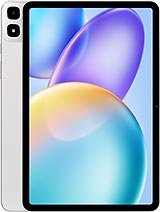
Xpad 30 Pro
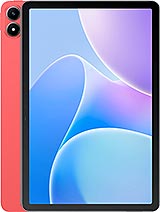
Xpad 20

Hot 40 Pro

Hot 70 Pro
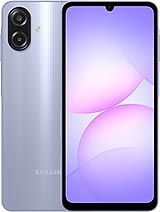
Galaxy A07 4G