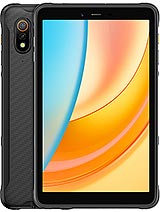
Huawei MatePad Pro Max review
This tablet suits media consumers, note-takers, and professionals embedded in Huawei or web-based workflows. Anyone whose creative tools live in iOS, Adobe, or Android's full app depth should cross-shop iPad Pro or Galaxy Tab S instead.
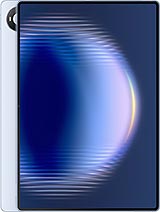
This review is written with AI assistance from Huawei’s published specifications and public benchmark data for the Huawei MatePad Pro Max, and the rating is spec-based. GoSolo does not physically test devices; where we estimate real-world behaviour such as battery life or charge time, we say so. How we rate phones.
Overview
The Huawei MatePad Pro Max is a slim 13.2-inch tablet with an excellent OLED display, strong processing, and stylus support, pitched at creative professionals and media consumers. At €1150, it delivers polished hardware and a thoughtful Harmony OS experience, though its isolated software ecosystem and modest camera punch hold it back from being a must-have over established iPad rivals.
Design and build
At 4.7mm thick and under 510g, the MatePad Pro Max is almost unfairly thin. It sits lighter in hand than most 13-inch tablets and feels like glass and aluminum done with care—no flex, no rattles. The 3:2 aspect ratio is intentional and useful, mirroring paper or content that matters on tablets rather than cramming widescreen into the frame. Stylus support and those accessory connector pins suggest Huawei is serious about creative users. The trade-off is obvious: at this thickness, there is no room for expansion slots or batteries that can take a beating. The glass back collects fingerprints aggressively, and the overall price sits high for a slate with no cellular option.
Display
The OLED panel is the real story here. 3000×2000 pixels at 273 ppi is sharp; 144Hz feels fluid for scrolling and drawing; and 1600 nits peak brightness is overkill in most rooms but genuinely useful outdoors or under studio lighting. Color accuracy and contrast are excellent—this screen excels at photo editing, video review, and simply reading text without fatigue. It is the kind of display that justifies the tablet format for creative work. There is also a PaperMatte version available, which dulls reflections and adds tooth for stylus feel; that trade-off is personal, but the base OLED is not the weak link here.
Performance
The Kirin T93 Pro holds its own. Multitasking is smooth, apps launch quickly, and video playback is stable. Benchmarks suggest it is a step below the latest Snapdragon or Apple Silicon, but in day-to-day use—splitting windows, editing, browsing—it does not stutter. Gaming is handled well if not blazingly fast. The real limitation is not raw speed but app availability: Harmony OS means fewer games, fewer niche creative tools, and fewer productivity apps compared to iPad or Android tablets. For basic office work, content consumption, and stylus-based note-taking, it is plenty. For a professional who relies on Adobe Creative Cloud or specialized software, it is a wall.
Software
Harmony OS 4.3 is refined and tablet-aware. The UI scales well to 13.2 inches; split-screen multitasking is intuitive; and stylus integration feels natural. The problem is ecosystem depth. Huawei's app store has grown but remains fractured—many popular apps exist, but some are missing, and alternatives can be rough around the edges. Video editing, photo management, and note-taking are fine; using Procreate or Lightroom is not an option. For users willing to work within Huawei's software sphere or who rely mainly on web apps and Huawei's own services, it works. For those locked into Adobe, Final Cut Pro, or iOS-only tools, this tablet is a non-starter.
Camera
The 50MP rear camera and 12MP front camera are present but unremarkable. 4K video maxes out at 30fps, and there is no ultrawide or zoom lens—just a single wide module. For occasional photos and video calls, this is fine. For creating content on the tablet, it is adequate. Compared to iPad Pro or Galaxy Tab S, it is clearly the weaker link: the single lens means less versatility, and the 30fps video cap is restrictive if you plan to shoot footage regularly. If the tablet is primarily for consuming content and light photo capture, do not sweat it; if video creation matters, look elsewhere.
Battery and charging
The 10400 mAh cell (9760 mAh in Europe) should deliver around 10–12 hours of mixed use—solid for a tablet, though not exceptional. Charging is rated at 66W, which is reasonable but not class-leading; rivals at this price often match or exceed it. Actual charge time is about an hour and a half to full, which is fine for a device this size. The cable and charger are sold separately, typical of Huawei's recent practice. For heavy users, having a fast charger on hand is important, but a single battery will carry you through a full day of work.
Value and verdict
At €1150, this tablet sits in flagship territory. It competes directly with iPad Pro and Galaxy Tab S models, and it holds its own on hardware and display. The problem is software lock-in: you are buying into Harmony OS's smaller ecosystem, and that narrowness is not a temporary issue—it is baked in. If you are already invested in Huawei's services, use web apps as your primary tools, or want a stylus tablet without Apple's ecosystem, this makes sense. If you need Adobe, Procreate, or the breadth of apps iPad offers, the MatePad Pro Max is a beautiful dead end. For content consumption and note-taking, it shines; for creation-focused work that demands specific software, it stumbles before it starts.
Verdict
This tablet suits media consumers, note-takers, and professionals embedded in Huawei or web-based workflows. Anyone whose creative tools live in iOS, Adobe, or Android's full app depth should cross-shop iPad Pro or Galaxy Tab S instead.
- 13.2-inch OLED screen at 273 ppi with 144Hz, 1600 nits peak brightness, and 3:2 aspect ratio that suits content creation and reading
- Thin and light at 4.7mm and 499–509g, genuinely pocketable for a tablet this size
- Kirin T93 Pro delivers smooth multitasking and app performance without thermal issues in daily use
- Stylus support and Harmony OS 4.3 tablet features offer a cohesive creative workflow for note-taking and design
- Harmony OS app ecosystem remains smaller and more fragmented than iPadOS or Android, limiting third-party software choice for professionals
- 50MP camera with 4K@30fps is functional but unremarkable for video and stills compared to iPad Pro, lacking the wider lens variety
- No cellular option, no microSD expansion, and no reversible storage—buyers are locked into their initial config
Huawei MatePad Pro Max Key Specifications
The essentials at a glance. See the full spec sheet.
| Released | 2026, May 07 |
|---|---|
| Display | 13.2 inches, 518.8 cm2 (~91.4% screen-to-body ratio), OLED, 1B colors, 144Hz, HDR, 1600 nits (peak) |
| Resolution | 3000 x 2000 pixels, 3:2 ratio (~273 ppi density) |
| Chipset | Kirin T93 Pro |
| RAM & storage | 256GB 12GB RAM, 512GB 12GB RAM, 512GB 16GB RAM, 1TB 20GB RAM |
| Main camera | 50 MP, f/1.8, (wide), PDAF |
| Selfie camera | 12 MP, f/2.4 |
| Battery | 10400 mAh |
| Software | Harmony OS 4.3 |
| Dimensions | 289.3 x 196.3 x 4.7 mm (11.39 x 7.73 x 0.19 in) |
| Weight | 499 g or 509 g (1.10 lb) |
| Build | Glass front, aluminum frame, aluminum back |
| Durability | Stylus support |
| Network | No cellular connectivity |
| NFC | No |
| USB | USB Type-C 3.1, OTG, DisplayPort 1.2, accessory connector pins |
Huawei MatePad Pro Max FAQ
Common questions, answered from the spec sheet.
Does the MatePad Pro Max support 5G?
No. The MatePad Pro Max tops out at No cellular connectivity, without 5G.
What chipset does the MatePad Pro Max use?
The MatePad Pro Max runs on the Kirin T93 Pro.
What display does the MatePad Pro Max have?
A 13.2 inches, 518.8 cm2 (~91.4% screen-to-body ratio) OLED, 1B colors, 144Hz, HDR, 1600 nits (peak), 3000 x 2000 pixels, 3:2 ratio (~273 ppi density).
How big is the MatePad Pro Max battery?
The MatePad Pro Max has a 10400 mAh battery.
Does the MatePad Pro Max have NFC?
No, the MatePad Pro Max does not list NFC support.
Is the MatePad Pro Max water resistant?
The MatePad Pro Max carries a Stylus support rating.
Does the MatePad Pro Max support a microSD card?
No, the MatePad Pro Max does not support expandable storage.
Alternatives to consider
If the MatePad Pro Max isn’t quite right, these are the closest calls.
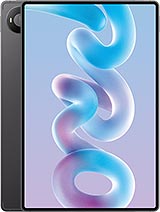
MatePad Pro 12 (2026)
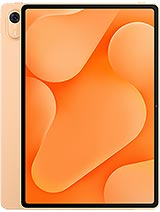
MatePad Air Z
MatePad Air Z Enjoy
MatePad Air (2026)
Pad 9 Pro Max