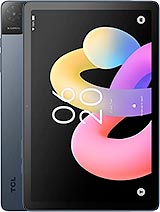
Huawei MatePad Air Z review
The MatePad Air Z is a solid tablet for readers, note-takers, and office workers who prioritize a smooth 144Hz display and lightweight design over raw power. Skip it if you need cellular connectivity, high-end gaming performance, or a broader app ecosystem than HarmonyOS currently offers.
This review is written with AI assistance from Huawei’s published specifications and public benchmark data for the Huawei MatePad Air Z, and the rating is spec-based. GoSolo does not physically test devices; where we estimate real-world behaviour such as battery life or charge time, we say so. How we rate phones.
Overview
The MatePad Air Z is a sleek 12-inch tablet with a 144Hz display and sharp design, but the Kirin T93S chipset is modest for this price, and the 1080p camera ceiling limits its appeal beyond media consumption. It's a solid mid-range option if you value screen smoothness over raw power, but heavier hitters exist at the price point.
Design & Build
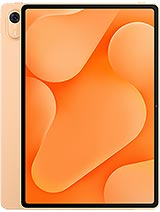
At 5.9mm thick and 555g, the MatePad Air Z is one of the slimmer 12-inch tablets on the market—thin enough to feel like a premium object, but not so wisp-light that it feels toy-like. The aluminum frame and back paired with a glass front give it a cohesive, understated look that doesn't scream for attention. It comes in three colors—Orange, Blue, Gray—with the Soft Light edition offering a matte display option that cuts glare and fingerprints, a practical choice if you use it outdoors or in bright rooms. The built-in stylus support is a welcome inclusion at this price; many rivals either omit it or sell the stylus separately, adding EUR 50–100 to the effective cost.
Display
The 12.0-inch 2800×1840 IPS LCD is the real highlight here. At 279 ppi and a 3:2 aspect ratio, it's sharper and taller than the wide 16:10 screens most Android and iPad competitors use, which makes it better for reading, documents, and split-screen work without constant scrolling. The 144Hz refresh rate is the standout spec: scrolling through long articles, social feeds, or spreadsheets feels visibly smoother than 60Hz competitors, and if you're a gamer, it matters for action titles. At 900 nits brightness and HDR Vivid support, outdoor visibility is solid, though it's not as aggressively bright as some AMOLED flagships. For a mid-tier tablet, this display punches above its weight.
Performance
The Kirin T93S (or T93SD variant) is the chip that defines this tablet's position. It's a competent processor for everyday use—web browsing, apps, streaming, light photo editing—but it's not a powerhouse. In a market where rivals at EUR 460 include Snapdragon 8 Gen 3 or MediaTek Dimensity options, the Kirin T93S feels a step behind. Multitasking with many apps open will show lag; gaming at high settings will throttle; and video rendering will take longer than on faster siblings. The 8GB or 12GB RAM options help offset this, but the core bottleneck remains the chipset. This is a tablet that wants to be your relaxed media consumer and document reader, not your creative workstation.
Software
HarmonyOS 7.0 runs the show, Huawei's proprietary operating system designed after Google Play Services became unavailable to the company. By now, the app ecosystem has matured enough that most tasks—email, messaging, streaming, productivity—are covered. Performance is responsive and the interface is broadly intuitive for anyone familiar with Android, though some regional app gaps remain depending on your location. Huawei's own productivity apps integrate well with the stylus and large screen, and the interface scales cleanly across the 12-inch canvas.
Camera
The 50MP rear camera is a numbers game that doesn't pan out in real use. The f/1.8 aperture and phase-detect autofocus sound capable, but the cap at 1080p video output is a significant limitation—most tablets at this price and up offer 2K or 4K. The 8MP front camera is typical for a tablet and handles video calls adequately. There's no mention of computational photography tricks, night mode, or AI upscaling, so what you get is straightforward: a functional rear camera for documents and occasional stills, but not one that gives you reason to use the tablet over a smartphone for photography.
Battery & Charging
The 10,100mAh battery should deliver about 10–12 hours of mixed use, depending on display brightness and chipset load—respectable for a 12-inch tablet and enough for a full work or travel day. The spec sheet mentions 66W charging capability, which is reasonably quick for a device this size; at that rate, expect a full recharge in about 90 minutes from empty. This is competitive with peers and strikes a balance between charging speed and thermal management. Wi-Fi-only connectivity means no cellular drain, which helps battery endurance.
Value & Verdict
At EUR 460, the MatePad Air Z slots into the serious mid-range tablet space. It offers a genuinely good display, stylus support, and lightweight build—three concrete reasons to consider it. The Kirin T93S is its main constraint: it's not weak, but it's not the fastest chip at this price, which means performance-hungry tasks or games will reveal its limits. The 1080p camera ceiling and Wi-Fi-only availability are secondary drawbacks that will matter more to some buyers than others. This tablet makes sense if you value screen smoothness, productivity apps, and a portable form factor for reading, note-taking, and casual work. If you need gaming performance, 4K video, or cellular connectivity, or if you're in a region where the HarmonyOS ecosystem is thin, look elsewhere.
Verdict
The MatePad Air Z is a solid tablet for readers, note-takers, and office workers who prioritize a smooth 144Hz display and lightweight design over raw power. Skip it if you need cellular connectivity, high-end gaming performance, or a broader app ecosystem than HarmonyOS currently offers.
- 144Hz IPS LCD display with 900 nits brightness and 85.9% screen-to-body ratio—genuinely smooth for scrolling and video, and the tall 3:2 aspect ratio is better for productivity than the wide formats most rivals favor.
- Ultra-thin at 5.9mm and light enough to handle one-handed (555g), without feeling fragile—the aluminum and glass build feels composed rather than cheap.
- Stylus support out of the box, a feature many tablets at this price omit or charge extra for, useful if you sketch, annotate, or take handwritten notes.
- Kirin T93S is a mid-range chip that struggles with heavy multitasking, gaming, or video editing compared to Snapdragon 8-series rivals at the same EUR 460 price—performance feels adequate rather than nimble.
- Camera is deliberately limited: 50MP rear sensor but locked to 1080p video output, and no meaningful computational photography—works for quick snaps and Zoom calls, but not competitive with full-featured tablets.
- No cellular option and no expandable storage means you're locked into Wi-Fi only and the 256GB base model, limiting flexibility for on-the-go use.
Huawei MatePad Air Z Key Specifications
The essentials at a glance. See the full spec sheet.
| Released | 2026, September 30 |
|---|---|
| Display | 12.0 inches, 426.4 cm2 (~85.9% screen-to-body ratio), IPS LCD, 144Hz, HDR Vivid, 900 nits |
| Resolution | 2800 x 1840 pixels, 3:2 ratio (~279 ppi density) |
| Chipset | Kirin T93SD or Kirin T93S |
| RAM & storage | 256GB 8GB RAM, 256GB 12GB RAM |
| Main camera | 50 MP, f/1.8, (wide), PDAF |
| Selfie camera | 8 MP, f/2.2 |
| Battery | 10100 mAh |
| Software | HarmonyOS 7.0 |
| Dimensions | 183.6 x 270.5 x 5.9 mm (7.23 x 10.65 x 0.23 in) |
| Weight | 555 g (1.22 lb) |
| Build | Glass front, aluminum frame, aluminum back |
| Durability | Stylus support |
| Network | No cellular connectivity |
| NFC | No |
| USB | USB Type-C 2.0, OTG, magnetic accessory connector |
Huawei MatePad Air Z FAQ
Common questions, answered from the spec sheet.
Does the MatePad Air Z support 5G?
No. The MatePad Air Z tops out at No cellular connectivity, without 5G.
What chipset does the MatePad Air Z use?
The MatePad Air Z runs on the Kirin T93SD or Kirin T93S.
What display does the MatePad Air Z have?
A 12.0 inches, 426.4 cm2 (~85.9% screen-to-body ratio) IPS LCD, 144Hz, HDR Vivid, 900 nits, 2800 x 1840 pixels, 3:2 ratio (~279 ppi density).
How big is the MatePad Air Z battery?
The MatePad Air Z has a 10100 mAh battery.
Does the MatePad Air Z have NFC?
No, the MatePad Air Z does not list NFC support.
Is the MatePad Air Z water resistant?
The MatePad Air Z carries a Stylus support rating.
Does the MatePad Air Z support a microSD card?
No, the MatePad Air Z does not support expandable storage.
Alternatives to consider
If the MatePad Air Z isn’t quite right, these are the closest calls.
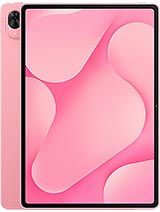
MatePad Air Z Enjoy
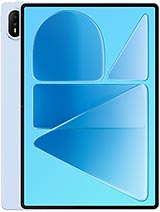
MatePad Air (2026)
MatePad Pro 12 (2026)
MatePad Pro Max
Pad 9 Pro Max