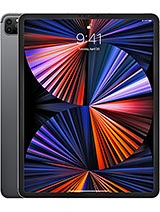
Apple iPad Pro 12.9 2021 review
This iPad suits creative professionals and developers who have a genuine need for desktop apps, a large bright screen, and portability within the same form factor. General consumers and students will find it overkill and expensive; a cheaper iPad Air or standard iPad delivers the same day-to-day experience at a fraction of the price."
This review is written with AI assistance from Apple’s published specifications and public benchmark data for the Apple iPad Pro 12.9 2021, and the rating is spec-based. GoSolo does not physically test devices; where we estimate real-world behaviour such as battery life or charge time, we say so. How we rate phones.
Overview
The iPad Pro 12.9 pairs desktop-class M1 processing with a bright 120Hz XDR display, making it a capable secondary machine for creative work and video editing. The premium price and heavy weight demand real professional use to justify the purchase—it's not a casual tablet.
Design & build
Thin at 6.4mm and clad in glass, aluminum, and anodized frame, this iPad looks and feels refined without being precious. The 12.9-inch display stretches edge to edge at 85% screen-to-body ratio, which is elegant but means bezels are minimal—there is nowhere comfortable to rest your thumbs without accidentally triggering controls. At 682 grams for the Wi-Fi model, it is noticeably heavier than the 2020 iPad Pro and closer to a thin laptop in weight. If you plan to use this standing against a case or on a desk, the heft is forgettable. Hold it in your lap or one hand for extended reading, and the mass compounds fatigue. The 4:3 aspect ratio preserves vertical space for document work, unlike widescreen tablets, and the glass back remains a fingerprint magnet that demands regular cleaning.
Display
The 12.9-inch Liquid Retina XDR screen is the iPad Pro's calling card, and it delivers. Mini-LED backlighting enables local dimming that produces 1600-nit peak brightness and deeper blacks than standard LCD panels, which matters for HDR video and photo editing in daylight. The 120Hz refresh and ProMotion support make scrolling, stylus responsiveness, and video playback feel fluid—a step up from 60Hz that you notice immediately. At 265 ppi, pixel density is less sharp than a phone, but from typical viewing distance (9–12 inches) text and detail remain crisp. HDR10 and Dolby Vision support suit creative workflows; if you are editing in Adobe or Final Cut Pro, the color accuracy and brightness headroom justify the cost. The oleophobic coating helps repel smudges, though oils still accumulate fast.
Performance
The M1 chip is the core reason professionals should look at this tablet. It is the same processor that powers 2021 MacBook Airs, with an octa-core CPU and 8-core GPU, and it brings genuine desktop-class performance. Final Cut Pro, Logic Pro, Adobe Lightroom, and DaVinci Resolve run natively without slowdown, enabling real video editing, audio production, and photo grading workflows on one device. Gaming and casual apps are overkill at this level, but the power scales: 512GB and 16GB RAM configs suit projects with large video or design files; the base 128GB with 8GB RAM handles lighter tasks but will strain with heavy multitasking or 4K footage imports. There is no thermal throttling in normal use, though sustained gaming or render jobs may raise fan noise, which is rare but audible. For a 2021 flagship tablet, this performance tier remains ahead of most rivals and will stay relevant for years.
Software
iPadOS 14.5.1 shipped at launch, with upgrades to iPadOS 26.4 available. Apple's tablet OS has narrowed the gap with desktop macOS, especially for creative apps, but it still lacks file management granularity, native external monitor support (though Thunderbolt docks help), and some keyboard and trackpad behaviors that feel less intuitive than macOS. Multitasking via Split View and Slide Over works but feels less natural than tiling on a desktop. However, for focused creative work—editing video, retouching photos, recording audio—iPadOS is stable and fast. The App Store's creative tools are robust, and the integration with Apple Pencil remains a high point. If you are already in the macOS and iOS ecosystem, the continuity features make this a natural fit.
Camera
The rear setup pairs a 12MP f/1.8 main sensor with a 10MP 125-degree ultrawide and a LiDAR scanner for depth sensing. The main lens is competent for well-lit shoots and the ultrawide lens captures landscape and group composition, but in low light both sensors fall behind what you would expect from a phone or dedicated camera at this price tier. The 4K video and 1080p slow-motion recording are solid, but the framerate choices (24, 25, 30, 60fps for 4K; 120/240fps only at 1080p) feel limited versus what newer tablets offer. The LiDAR depth scanner is the standout: it powers room-scanning AR apps, portrait mode with genuine depth separation, and measurement tools that are genuinely useful for design and surveying work. The 12MP ultrawide selfie camera handles video calls and Face ID without issue, but the rear cameras overall feel like an afterthought beside the M1 and display investment.
Battery & charging
The 10758 mAh battery yields roughly 10 to 12 hours of screen-on time for reading, video playback, or light creative work. Heavy video editing or sustained gaming can shave that to 8 to 9 hours, but most users will get through a full workday without charging. The significant weakness is charging speed: Apple bundles a 10W USB Power Delivery charger, which means a full recharge takes around 3 to 4 hours. By 2021 standards this felt slow—rivals offered 20W, 30W, or faster. Wireless charging is absent, which is a minor miss given the glass back. For a device that positions itself as a laptop replacement, faster charging would have been welcome.
Value & verdict
At about 1200 EUR, the iPad Pro 12.9 (2021) is a premium tablet that demands justification beyond the price. The M1 chip and XDR display are genuine strengths if you actually use desktop software—video editing, design work, music production—where the large screen and processing power deliver real productivity gains. For casual web browsing, reading, streaming, and note-taking, a mid-range iPad Air or the entry iPad offer 80% of the experience at half the cost. The weight and heft matter: this is not a device you lounge with; it lives on a desk, easel, or stand. If you are a content creator weighing a portable iPad Pro versus a laptop, the choice hinges on whether your main creative tools run natively on iPadOS—if they do, the form factor and display are compelling. If you are a student or general user tempted by the specs, save money and buy a cheaper tablet plus a laptop.
Verdict
This iPad suits creative professionals and developers who have a genuine need for desktop apps, a large bright screen, and portability within the same form factor. General consumers and students will find it overkill and expensive; a cheaper iPad Air or standard iPad delivers the same day-to-day experience at a fraction of the price."
- M1 chip handles desktop apps—Final Cut Pro, Adobe suite, Procreate—without compromise, making this a genuine editing platform, not a simulator
- Liquid Retina XDR display with 1600-nit peak brightness and 120Hz refresh is genuinely pleasant for both content creation and outdoor use
- Thunderbolt 4 USB-C opens real peripherals: external SSDs, displays, docks, and audio interfaces
- LiDAR scanner and dual rear cameras enable depth-aware apps and AR workflows
- 682 grams (Wi-Fi) makes it heavy enough to notice when hand-held for long stretches, and the 12.9-inch footprint can feel unwieldy without a stand
- 10W charging is sluggish; rivals and even older iPad Pros have backed faster wired speeds, and wireless charging remains absent
- Camera system remains basic for a tablet at this price: 12MP main sensor and modest low-light performance feel afterthought-ish next to the screen investment
Apple iPad Pro 12.9 2021 Key Specifications
The essentials at a glance. See the full spec sheet.
| Released | 2021, April 20 |
|---|---|
| Display | 12.9 inches, 515.3 cm2 (~85.4% screen-to-body ratio), Liquid Retina XDR mini-LED LCD, 120Hz, HDR10, Dolby Vision, 1000 nits (typ), 1600 nits (peak) |
| Resolution | 2048 x 2732 pixels, 4:3 ratio (~265 ppi density) |
| Chipset | Apple M1 |
| RAM & storage | 128GB 8GB RAM, 256GB 8GB RAM, 512GB 8GB RAM, 1TB 16GB RAM, 2TB 16GB RAM |
| Main camera | 12 MP, f/1.8, (wide), 1/3.0", 1.22µm, dual pixel PDAF 10 MP, f/2.4, 125˚ (ultrawide) TOF 3D LiDAR scanner (depth) |
| Selfie camera | 12 MP, f/2.4, 122˚ (ultrawide) |
| Battery | 10758 mAh |
| Software | iPadOS 14.5.1, upgradable to iPadOS 26.4 |
| Dimensions | 280.6 x 214.9 x 6.4 mm (11.05 x 8.46 x 0.25 in) |
| Weight | 682 g (Wi-Fi), 685 g (5G) (1.50 lb) |
| Build | Glass front, aluminum back, aluminum frame |
| Durability | Stylus support |
| Network | GSM / CDMA / HSPA / EVDO / LTE / 5G |
| NFC | No |
| USB | USB Type-C 4 (Thunderbolt 4), DisplayPort, magnetic connector |
Apple iPad Pro 12.9 2021 FAQ
Common questions, answered from the spec sheet.
Does the iPad Pro 12.9 2021 support 5G?
Yes. The iPad Pro 12.9 2021 supports 5G networks.
What chipset does the iPad Pro 12.9 2021 use?
The iPad Pro 12.9 2021 runs on the Apple M1.
What display does the iPad Pro 12.9 2021 have?
A 12.9 inches, 515.3 cm2 (~85.4% screen-to-body ratio) Liquid Retina XDR mini-LED LCD, 120Hz, HDR10, Dolby Vision, 1000 nits (typ), 1600 nits (peak), 2048 x 2732 pixels, 4:3 ratio (~265 ppi density).
How big is the iPad Pro 12.9 2021 battery?
The iPad Pro 12.9 2021 has a 10758 mAh battery.
Does the iPad Pro 12.9 2021 have NFC?
No, the iPad Pro 12.9 2021 does not list NFC support.
Is the iPad Pro 12.9 2021 water resistant?
The iPad Pro 12.9 2021 carries a Stylus support rating.
Does the iPad Pro 12.9 2021 support a microSD card?
No, the iPad Pro 12.9 2021 does not support expandable storage.
Alternatives to consider
If the iPad Pro 12.9 2021 isn’t quite right, these are the closest calls.
iPad Pro 11 2021
![iPad Pro 12.9-inch (5th generation) [2021] product photo](https://api.mobileapi.dev/devices/867/thumb.png)
iPad Pro 12.9-inch (5th generation) [2021]
![iPad Pro 12.9-inch (4th generation) [2020] product photo](https://api.mobileapi.dev/devices/868/thumb.png)
iPad Pro 12.9-inch (4th generation) [2020]
![iPad Pro 11-inch (5th generation) [2021] product photo](https://api.mobileapi.dev/devices/874/thumb.png)
iPad Pro 11-inch (5th generation) [2021]
Pad 5 Pro