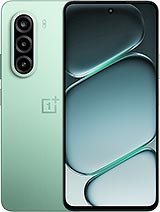
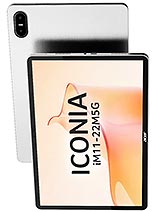
Acer Iconia iM11 review
The Iconia iM11 suits someone who reads, streams, and works on documents and email and wants a tablet light enough to carry without needing daily charging. Skip it if you shoot video, edit photos, work in bright sunlight often, or need fast charging to fit a busy schedule.
This review is written with AI assistance from Acer’s published specifications and public benchmark data for the Acer Iconia iM11, and the rating is spec-based. GoSolo does not physically test devices; where we estimate real-world behaviour such as battery life or charge time, we say so. How we rate phones.
Overview
The Iconia iM11 is a lean, lightweight 11-inch tablet built for reading, streaming, and work on a single charge. The Dimensity 7050 and 7400mAh battery deliver all-day runtime without excessive heft, but the 1080p camera, IPS LCD display, and no-frills design aim at value rather than power users.
Design & build
At 535g and 7.9mm, the Iconia iM11 is genuinely light for its screen size—lighter than most 11-inch competitors and lean enough to pocket or carry one-handed for short bursts. Glass front and aluminum back with frame feel solid, not cheap, though the choice avoids the heft penalty many rivals carry. The 3:2 aspect ratio and 83.3% screen-to-body ratio leave slim bezels, which helps it feel modern. Stylus support is there, a sensible add for note-taking, though Acer bundles it separately at this price. Dual SIM and a shared microSD slot are typical compromises for tablets, though the magnetic accessory connector pins suggest Acer intends a keyboard dock or stand as an optional purchase.
Display
The 11.45-inch IPS LCD is readable indoors and in soft shade, but 450 nits is not enough for direct sunlight—you will lose visibility in bright outdoor use, a real limitation for a tablet meant to travel. The 90Hz refresh keeps scrolling smooth for web browsing and reading, a small but appreciated detail at this price. The 1440×2200 resolution at 3:2 ratio spreads pixels to about 230 ppi, which is sharp enough for text and spreadsheets but not exceptional. No OLED means contrast will feel muted compared to flagship tablets or even mid-range rivals that have shifted to OLED by 2026. For a device at €230, an IPS LCD is a reasonable cost trade-off, but the brightness ceiling is a real gap.
Performance
The Mediatek Dimensity 7050 is a proven mid-range chip that handles office work, streaming in HD, and casual games without dropping frames on settings most people accept. Genshin Impact and similar titles will run on lower settings at playable frame rates, but do not expect console-style performance or competitive gaming. The Mali-G68 MC4 GPU is competent for everyday apps and video playback but not a graphics powerhouse. With 8GB RAM and UFS 3.1 storage, app switching is snappy and file transfers are fast over USB-C. In 2026, this is solid ground-floor performance for a budget tablet; it will not impress power users or heavy gamers, but it will not frustrate someone using it for productivity and leisure.
Software
Android 15 brings all the standard tablet refinements Acer can layer on top—split-screen multitasking, improved keyboard and trackpad support for a dock (if you buy one), and the full Google ecosystem. No surprises here; the OS experience will be smooth and familiar. Acer's skin is minimal, which helps; the tablet does not bloat the experience with redundant apps or intrusive ads. Updates and security patches will follow the usual path for mid-range tablets, not flagship-level frequency but adequate for most users.
Camera
The 16MP rear sensor with LED flash is fine for video calls and scanning documents, adequate for casual photos and social media clips, but not suited to anything beyond that. No optical zoom, no ultrawide, and the 2MP macro lens is a gimmick that does not justify real use. Video maxes out at 1080p@30fps, which means no 4K capture, no slow-motion, and no cinema-grade output. The 8MP front camera for selfies and calls is standard. If photography matters to you at all, look elsewhere; this tablet is a communication tool, not a creative one.
Battery & charging
The 7400mAh battery is the standout. On average use—reading, email, video streaming, light work—you will see a full day without plugging in, sometimes close to a day and a half. Heavy gaming or continuous video editing will drain it faster, but for the intended audience, this is real value. The 18W charging speed, however, is a weakness. By mid-2026 standards, rivals in this price tier now push 30W or more, meaning the Iconia will take several hours to fill from empty. If you are accustomed to modern phone charging speeds, prepare for patience.
Value & verdict-context
At €230, the Iconia iM11 is priced for the student, reader, or remote worker who wants an 11-inch screen without the weight or cost of a flagship. The combination of lightweight build, long battery life, and decent performance for email and streaming makes it a practical choice for that user. The catch is that you are paying for portability and battery stamina, not for screen quality, camera capability, or charging speed. For the same money or less, you may find competitors with OLED displays or faster charging, but they will weigh more or have shorter battery life. The choice depends on whether you value all-day runtime and portability over screen brightness and convenience features.
Verdict
The Iconia iM11 suits someone who reads, streams, and works on documents and email and wants a tablet light enough to carry without needing daily charging. Skip it if you shoot video, edit photos, work in bright sunlight often, or need fast charging to fit a busy schedule.
- 7400mAh battery delivers a full day of reading and video on moderate use, enough to spare daily charging
- Lightweight at 535g and just 7.9mm thick, genuinely portable for an 11-inch slate
- Dimensity 7050 handles streaming, email, and light gaming without stuttering at everyday tasks
- microSD slot allows expansion beyond the 128GB base, useful for media hoarding
- 1080p-only video output and 16MP camera limit this to basic document scans and Zoom calls; no optical zoom or low-light performance
- IPS LCD at 450 nits washes out in direct sunlight and lacks the contrast of OLED, a notable step back for a tablet at this price in 2026
- 18W charging is slow by current standards; rivals in this segment now hit 30W, so filling the 7400mAh will take several hours
Acer Iconia iM11 Key Specifications
The essentials at a glance. See the full spec sheet.
| Released | 2026, May 07 |
|---|---|
| Display | 11.45 inches, 387.6 cm2 (~83.3% screen-to-body ratio), IPS LCD, 90Hz, 450 nits |
| Resolution | 1440 x 2200 pixels, 3:2 ratio (~230 ppi density) |
| Chipset | Mediatek Dimensity 7050 (6 nm) |
| RAM & storage | 128GB 8GB RAM |
| Main camera | 16 MP (wide) 2 MP (macro) |
| Selfie camera | 8 MP |
| Battery | 7400 mAh |
| Software | Android 15 |
| Dimensions | 261.7 x 177.7 x 7.9 mm (10.30 x 7.00 x 0.31 in) |
| Weight | 535 g (1.18 lb) |
| Build | Glass front, aluminum frame, aluminum back |
| Durability | Stylus support |
| Network | GSM / HSPA / LTE / 5G |
| NFC | No |
| USB | USB Type-C 2.0, OTG, magnetic accessory connector pins |
Acer Iconia iM11 FAQ
Common questions, answered from the spec sheet.
Does the Iconia iM11 support 5G?
Yes. The Iconia iM11 supports 5G networks.
What chipset does the Iconia iM11 use?
The Iconia iM11 runs on the Mediatek Dimensity 7050 (6 nm).
What display does the Iconia iM11 have?
A 11.45 inches, 387.6 cm2 (~83.3% screen-to-body ratio) IPS LCD, 90Hz, 450 nits, 1440 x 2200 pixels, 3:2 ratio (~230 ppi density).
How big is the Iconia iM11 battery?
The Iconia iM11 has a 7400 mAh battery.
Does the Iconia iM11 have NFC?
No, the Iconia iM11 does not list NFC support.
Is the Iconia iM11 water resistant?
The Iconia iM11 carries a Stylus support rating.
Does the Iconia iM11 support a microSD card?
Yes, the Iconia iM11 supports expandable storage (microSDXC (uses shared SIM slot)).
Alternatives to consider
If the Iconia iM11 isn’t quite right, these are the closest calls.
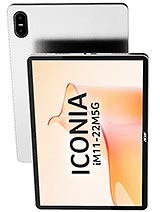
Iconia iM11-22M5G
Iconia Duo D12
Iconia Duo S12
Iconia A16
Galaxy A08 4G